
Airalo Review 2026: The Best eSIM for International Travel
A World in Reach contains affiliate links. If you make a purchase through these links, I may receive a commission at no cost to you! Read my full disclosure here.
Considering using an Airalo eSIM for your next international trip? Here is my full, unbiased Airalo review (including info on the new Discover+ eSIM that supports calls and texts) – check it out to see if Airalo is right for you!
No time to read? Find the perfect Airalo eSIM here and use code NEWTOAIRALO15 to save 15%! (new customers only – existing customers can use AIRALOESIM10 to save 10%)
As soon as I land in a new country, the first thing that I do is pick up a local SIM card.
It’s much more cost-efficient than adding an international plan through my carrier back home. Plus, it’s so nice to be able to use the internet for directions or to search for food recommendations without having to rely on Wi-Fi.
While planning my most recent international trip, I came across a TikTok about Airalo – an app that would let you purchase a digital SIM card right from your phone, without having to pick up a physical one at your destination.
I was intrigued, as I had never heard of the app (or even an eSIM). I was wondering – is Airalo legit?
I immediately downloaded the app, planning on testing it out in France and Germany when I traveled there over the holidays.
Once in Europe, I was able to easily install my Airalo eSIM and begin browsing. It was so simple to use, and it was cheaper than buying a SIM from one of the airport kiosks!
Do you want to learn more about Airalo to see if it might work for your next international trip? Keep reading for my full Airalo review – recently updated to cover the new Discover+ global eSIM that includes calling and texting in addition to data!
(Psst… want to save money on Airalo? Skip to the end for promo codes!)
Note: This post was NOT sponsored by Airalo. I purchased my Airalo eSIM with my own money and this is an unbiased review of my Airalo eSIM experience. This post does contain Airalo affiliate links. If you purchase an Airalo eSIM through one of my links, I will earn a commission at no cost to you.
A World in Reach contains affiliate links. If you make a purchase through these links, I may receive a commission at no cost to you! Read my full disclosure here.

AIRALO REVIEW
So, what is Airalo?
Airalo is a marketplace that sells eSIMs – a digital SIM that lets you activate a cellular plan without having to insert a physical SIM card into your phone.
eSIMs work in basically the same was as a physical SIM card.
The “e” in eSIM stands for embedded, which means that it’s embedded directly into your phone, rather than a physical SIM that you have to switch in and out.
Airalo offers local, regional, and global eSIMs. Local ones cover one country, regional eSIMs cover a region of the world (like Europe or the Caribbean), and the Global eSIM covers 87 countries around the world.
How does Airalo work?
Airalo eSIMs connect to local networks, depending on what country you’re in.
There are various eSIMs with differing amounts of data and lengths of validity. Plus, you can always easily top-up your eSIM if you need a bit more data.
And, you get rewarded with Airmoney each time that you purchase a new eSIM or top one up. You can use your Airmoney towards purchasing future Airalo eSIMs or top-ups.
AIRALO REVIEW
Will Airalo work with my phone?
Before purchasing an Airalo eSIM, you should first make sure that your phone is eSIM compatible.
Airalo keeps an ongoing list of compatible devices, making it easy to verify that your phone will work with the eSIM.
One other important thing to check is that your device is unlocked by your carrier.
Many carriers lock devices that are on a monthly payment plan or leased from the carrier. For phones that you pay for in full, the carriers sometimes lock devices for a certain time period after it is purchased (often 30-60 days).
If this is the case for you, Airalo might not work on your phone.
If you have an iOS device (like an iPhone), you can go to Settings > General > About.
Scroll down a bit and you should see “Carrier Lock” – if it says No SIM restrictions, you’re good to go!

If it says something like “SIM locked”, your might be restricted so that only SIMs from your original carrier (T-Mobile, Verizon, AT&T, etc.).
On an iPhone, this is what your screen will look like if your phone is SIM locked:

In this case, Airalo likely won’t work for you, but contact your carrier for more info.
Each carrier typically has their own policies for when the device can be unlocked, so go ahead and give your carrier a call to see if they can unlock yours.
Airalo also has documentation on how to check if your device is carrier unlocked for Android users.
The Airalo app itself is also pretty smart and can detect whether or not your device is eSIM compatible.
If you try to purchase an Airalo eSIM on a device not compatible, this will pop up:

Once you’ve checked that your device is compatible and carrier unlocked, you’re ready to use an Airalo eSIM!
AIRALO REVIEW
How to Use Airalo
Ready to use Airalo to stay connected while traveling abroad?
If you haven’t already, download the Airalo app from the App Store or Google Play.
Once the app is installed, browse the plans and destinations that are offered on Airalo.
Airalo has three types of eSIMs: Local, Regional, and Global:
- Local eSIMs allow you to get coverage in one of the 190+ countries that Airalo covers. This is your best choice if you’re only visiting one country on your trip.
- Regional eSIMs give coverage for entire regions and continents. For example, the Eurolink regional eSIM covers 39 countries in Europe, while the Island Hopper regional eSIM covers 24 Caribbean islands. There are also regional eSIMs for Africa and Asia. If you’re on a multicountry trip within the same region, this is the eSIM for you. On my trip to France and Germany, I chose to purchase the Eurolink regional eSIM.
- The Global eSIM gives coverage for 130 countries, ranging from 1-20 GB and 7-180 days of validity. If you’re planning a multi-country trip in multiple regions of the world, consider getting a Global eSIM. When purchasing the Global eSIM, you can choose between the Discover eSIM (data only) and the Discover+ eSIM (data, calls, and texts).
Prices for Airalo eSIMs vary based on location covered, data amounts, and validity periods. You can also buy top-up packages for your eSIM.
After you’ve chosen the best eSIM for your trip, purchase the eSIM through the Airalo app.
You can also purchase the eSIM from the Airalo website and connect it to your phone with a QR code.
Once the eSIM is purchased, it will appear in your My eSIMs list.
From here, you can install the eSIM onto your phone and activate the data.
The Airalo app will walk you through the installation and activation process step-by-step.
Once the data is activated, you’re ready to use your data plan!
AIRALO REVIEW
What networks does Airalo use for their eSIMs?
Airalo uses top cellular networks around the world to provide data for their eSIMs.
In the US, data is through AT&T and T-Mobile. In the United Kingdom, data is through Telefonica O2.
To see the networks for the country that you’re visiting, click the country name under “Local eSIMs,” click one of the packages, and scroll down to “Additional Information.”
There, the networks will be listed.

AIRALO REVIEW
Airalo Pros
- Airalo is easy to use and install
- Airalo eSIMs are affordable
- You don’t have to switch out (and risk losing) a physical SIM card when using an Airalo eSIM
- Airalo eSIMs work on phones that don’t have physical SIM slots
- Data provided by an Airalo eSIM is fast and reliable
Using an Airalo eSIM makes it super easy to stay connected while traveling abroad.
On my recent trip to Europe, I was able to purchase my Airalo eSIM using the airport Wi-Fi when I arrived in Germany.
After that, I never had to rely on Wi-Fi to use my phone’s GPS, look up travel tips, or post on social media.
Airalo eSIMs are also really affordable. I purchased the 30-day, 3 GB Eurolink package for just $13 – this was perfect for my nearly 2-week trip. Most local eSIMs start at just $4.50.
I also loved that I didn’t have to worry about losing my regular SIM card from home.
While some phones now have multiple SIM slots, mine only has one, so it was nice to be able to leave it in there for when I got back in the US.
My traveling companion had international data through T-Mobile, his service provider back home, and my data through Airalo was much faster.
Another Airalo win: having an eSIM means that your phone doesn’t need to have a physical SIM slot.
Newer devices, like the newest iPhones, have eliminated the physical SIM slot.
With an Airalo eSIM, you won’t have to worry about not being able to use your phone while abroad, as there isn’t anything that you have to physically insert into the SIM slot.
Lastly, there’s almost always a discount code that will let you save a bit on the cost of your Airalo eSIM.
AIRALO REVIEW
Airalo Disadvantages
- Most Airalo eSIMs are data only (some do support phone calls and texts)
- You’ll need to keep track of when your data is running low so you know when to top-up
The main disadvantage to Airalo is that most of their eSIMs only support data, not phone calls or text messaging.
However, Airalo recently released a new eSIM that does support phone calls and text messaging in addition to data: the Discover+ eSIM. You can read more about the new Discover+ eSIM a bit further down below.
The eSIMS (other than the Discover+ eSIM) also don’t come with a phone number. However, you can use the data from an Airalo eSIM to use apps like WhatsApp or Facebook Messenger for calling and texting.
If you don’t already have accounts on those apps, make sure to set them up BEFORE you leave your home country.
They typically need a phone number to create an account, and you might not be able to get the required text messages needed to create the account.
(This is a good tip to remember even if you don’t plan on using Airalo – trying to set up WhatsApp while in England without the ability to receive text messages to my phone number was impossible!)
You can check to see if an Airalo plan comes with a phone number or supports voice calls and texting by clicking the country or region, choosing a plan, and scrolling to “Additional Information.”
There, the plan types will be listed.
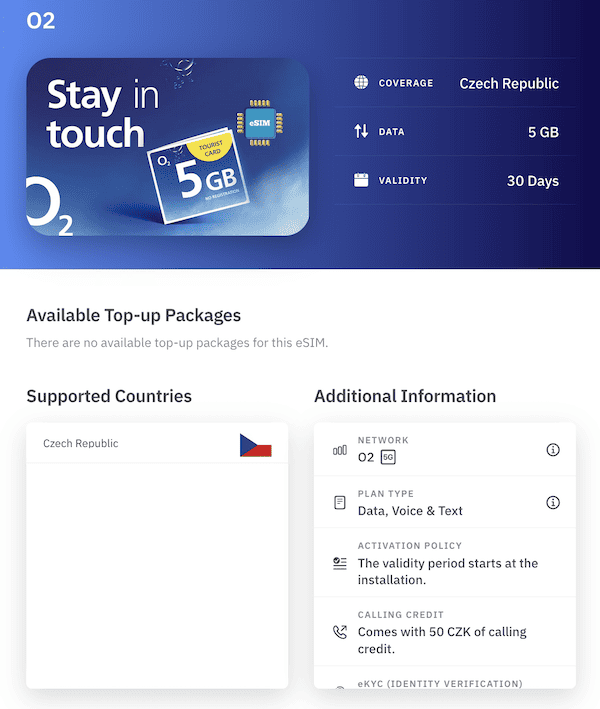
Although the Discover+ eSIMs do come with a phone number, it’s a +43 phone number – the country code for Austria. So, unless you’re in Austria, the phone number won’t be a local one.
Not having a local number isn’t the end of the world, but it can be helpful as restaurants or small businesses may be hesitant to answer a call from an international number due to the high costs.
There are definitely pros to having a local phone number while traveling – it saved me during my Amsterdam Airbnb mishap!
When I used my Airalo eSIM, my travel companion had a local number and the ability to make calls through his service provider.
If I was traveling solo, I might have opted to get a regular SIM with calling abilities and a local number rather than using an eSIM.
Another drawback of Airalo is that you don’t get a notification when your data is running low. Instead, once you’re out, it will just stop working.
This happened to me when I was in Paris. While in a café, my data was working one minute and not at all the next.
I wasn’t sure if the data had truly run out, if there was a glitch, or if I was just in a dead spot.
I had to find a Wi-Fi connection to connect to in order to top-up my Airalo eSIM.
Luckily, Airalo has made it easy to set up a way to track your Airalo eSIM data usage.
iPhone users can add an Airalo widget to their home screen that shows the name of the active Airalo eSIM as well as the amount of remaining data.
Once the data gets low, you can go ahead and top-up your Airalo eSIM so that it doesn’t run out.
To add the widget, just press and hold any icon or blank space on your home screen (the screen with all of your apps), click the + in the upper left corner, search widgets for “Airalo”, and then choose which widget you want to place on the home screen.

Both iPhone and Android users can also set up notifications that will let them know when their Airalo data is getting low.
To do so, go into your phone’s settings, find the Notification settings, and make sure Airalo notifications are turned on.
Airalo Discover+ eSIM: Data, Voice Calls, and Texting
One of my main complaints around Airalo was its lack of eSIMs with voice call support.
With the recent release of the Airalo Discover+ global eSIM, Airalo seeks to rectify the complaint that myself and many other users shared.
The Airalo Discover+ eSIM is a global eSIM, which means that you’ll have coverage in 130 countries around the world.
In addition to mobile data provided by all of Airalo’s other eSIMs, the Discover+ eSIM also supports calls and texts.
Essentially, with the Discover+ eSIM, your phone will function the same as it does when using your everyday service provider.
There are 6 different Discover+ eSIM options. The cheapest is $15 and includes 1 GB of data, 10 minutes for calling, 10 SMS messages, and lasts for 7 days
The most expensive Discover+ eSIM is $89, but it includes 20 GB of data, 200 minutes for calls, 200 SMS messages, and is valid for 365 days.
There are also various top-up options to extend your data/minutes/SMS messages and validity.
Each eSIM comes with a +43 number for global usage. +43 is the international calling code for Austria, so you’ll essentially get an Austrian phone number.
Although 10-20 minutes of calls might not seem like much, it would likely be plenty for a 1-2 week trip. How many long phone calls do you typically make while traveling, anyway (other than Facetiming your family)?
You can reserve those minutes for things like calling restaurants to make reservations or contacting an Airbnb host or your hotel in the case of an emergency.
For calling family and friends, you can stick with apps like WhatsApp or Facetime.
Alternatives to Airalo
If Airalo doesn’t seem like a right fit for you, there are several alternatives that can give you data while traveling internationally.
If I’m not using Airalo, my top pick is to purchase a physical SIM card once I arrive in the destination. You can almost always find these at the airport, but they’re also sold in convenience stores and local phone service provider stores.
The most expensive option for getting international data is paying for an international plan through your home phone service provider.
In the US, some T-Mobile customers can get free, unlimited high-speed data in some destinations. This is what my boyfriend used on our trip to France and Germany when I first used Airalo. His data worked, but my Airalo plan was speedier and more reliable.
Depending on your service provider, you can also pay a daily rate for international data. For AT&T customers, this is $10 a day. This can really add up if you’re going to be abroad for more than a few days.
Airalo isn’t the only eSIM provider, either. Holafly, Nomad, AloSim, and Maya Mobile are other popular eSIM providers. I haven’t personally used any of these, so I can’t speak to their quality.
Frequently Asked Questions about Airalo eSIMs
Is Airalo eSIM Legit?
Yes! Airalo is a legit, affordable, and safe to use app that can provide you an eSIM for your next trip. I’ve used Airalo on several trips and had no issues, just make sure that your device is compatible before purchasing.
Is there a downside to using eSIM?
One of the main downsides to using an eSIM like Airalo is that they don’t always include calling capabilities. But, if you set up an app that allows you to make calls, like WhatsApp, this won’t be a problem. The new Discover+ eSIM also includes calling & texts for 130 countries.
Can I use WhatsApp with Airalo?
Yes! Since most Airalo eSIMs don’t include calling, using WhatsApp is one of the best ways to make calls or send texts with the mobile data provided by Airalo. Just make sure to set up WhatsApp before leaving your home country as you’ll need to be able to receive text messages on your regular phone number.
Does eSIM drain battery?
Nope! In fact, eSIMs are more battery-efficient than regular SIM cards, so an Airalo eSIM can actually save you some battery juice!
Does Airalo use my phone number?
An Airalo data plan is completely separate from whatever mobile plan you have at home, so you can continue using your home phone number for calls and texts (as long as you have an international plan with your regular carrier) while also using an Airalo eSIM data plan.
Does Airalo eSIM give you a number?
This depends on which Airalo eSIM data plan you purchase. Most do not include a local number, but some (like the Airalo Czech Republic eSIM) do include a local number and calling. The Discover+ eSIM also provides a number. Each different eSIM will say if they include a number or not under “Additional Information.”
Should I install eSIM before or after travel?
You can install your Airalo eSIM before or after you arrive in your destination. Depending on the eSIM, the eSIM will either activate immediately or when you arrive in the destination the eSIM supports. Because of this, I recommend waiting until you arrive – just find a spot in the airport or train station with solid Wi-Fi to complete the installation.
Does Airalo need Wi-Fi?
You’ll need a stable Wi-Fi connection to purchase, install, and activate your Airalo eSIM. After it’s activated, as long as there is service for the provider the eSIM uses, you’ll be able to browse the internet, update social media, and make calls/texts on apps like WhatsApp without Wi-Fi.
Does Airalo support iMessage?
Yes, you can use iMessage with an Airalo eSIM. Messages you send to others might come from the email associated with your iCloud account (since your phone number is tied to your home carrier).
Airalo Review: Overall Thoughts
Having reliable internet access while traveling abroad is important to me, and using an Airalo eSIM is an easy and affordable way to stay connected.
The plans are cheap, the data was always fast and reliable, and it was so easy to set up. The only downside is the limited number of plans that support voice calls and come with a phone number, which Airalo is working on rectifying with the release of the Discover+ eSIM.
From now on, Airalo will be my go-to eSIM provider. While I’ve only used it in two countries so far, it has shown itself to be a convenient, reliable way to access data while abroad. I look forward to using it again on future travels!
Airalo eSIM Review: Get a discount on Airalo!
Ready to try Airalo for yourself? Download the Airalo app, or purchase an Airalo eSIM from their website, and use one of these promo codes at checkout for a discount on Airalo!
- New customers can use NEWTOAIRALO15 for 15% off your Airalo purchase!
- Existing customers can use AIRALOESIM10 for 10% off at Airalo
- Or, you can use the code SYDNEY9838 for $3 off your first Airalo purchase!
